Skip to content

Create Short Clips with Captions & Audiograms

Create engaging video clips with our AI. Perfect for YouTube, Instagram, and TikTok to enhance audience engagement.

How it works

Transform clips for greater social media reach

Effortlessly convert transcripts into engaging video clips. Engage your audience with visually appealing subtitles and captivating audiograms.
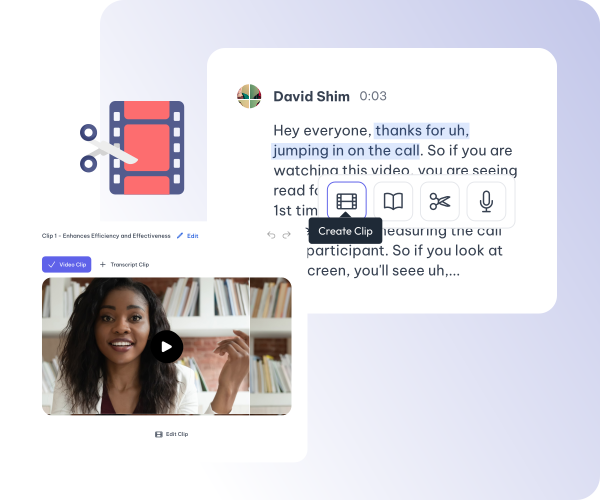
Transform transcripts into shareable videos

Easily create engaging clips from transcripts for social sharing.
  • Quick clip creation from your transcripts.
  • Generate share-ready reels and shorts for YouTube and social feeds.

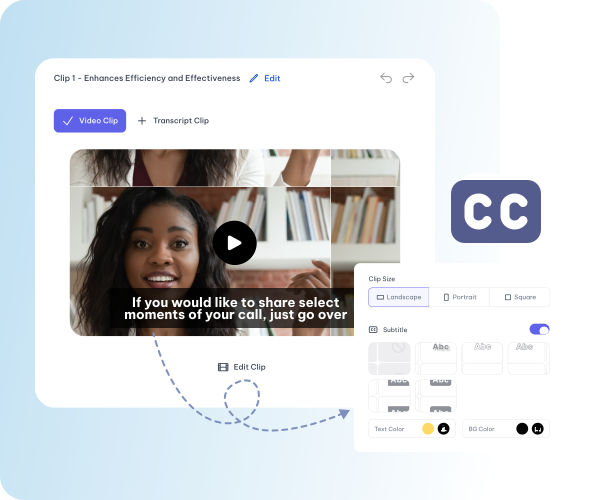
Increase audience retention with subtitles

Easily generate captivating subtitles to keep viewers hooked and enhance video accessibility.
  • Subtitles that enhance viewer watch time.
  • Accessible videos that engage a diverse audience.

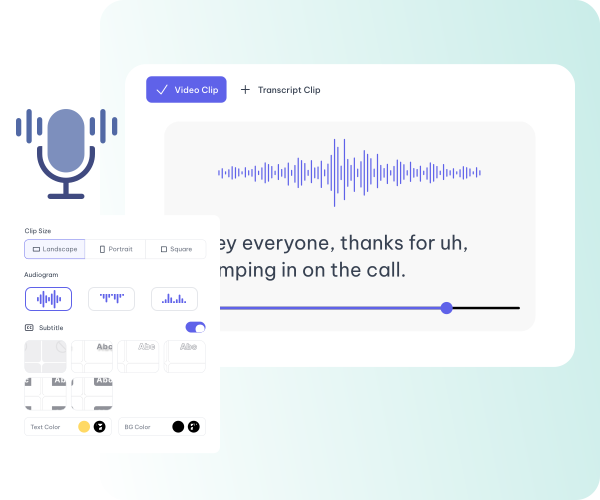
Engage your audience with audiogram

Convert audio to visual stories with our audiogram maker that capture attention and detail.

  • Visualize audio to captivate listeners
  • Dynamic visuals that amplify your message.
Features

Essential tools for your video content

Edit Easy with Text Based Editor

Automatically Edit Your Clips Using a Text-Based Video Editor for Seamless Creation. Also use AI to edit videos automatically.

Visualize Sound with Audiogram

Transform Audio into Striking Visuals with Audiogram, Creating Engaging Experiences

Automatic subtitle for perfect videos

Enhance Your Videos with Automatic Subtitles, Seamless Integration and Perfect Alignment

Customize Aspect Ratio

Customize Aspect Ratios and Resize Videos for Each Platform, Tailoring Your Content to Every Social Media.

Cloud storage for higher productivity

Store Your Data in the Cloud for Seamless Accessibility, Collaboration and Productivity

Share Your Clips Anywhere, Anytime

Share Your Clips Instantly, Anywhere, Anytime, Enhancing Connectivity and Collaboration

The rest of it

This is one tool in one workspace

Whatever you came here for, the rest is already available from the file you just uploaded — there is no second product to buy and nothing to export and re-import.

01 / 04

Upload once

One recording feeds every tool on the site. A file you transcribed can be clipped, captioned and summarised without uploading it again.

02 / 04

The transcript is the editor

Cut a sentence and the video cuts with it. Fix a name once and it is right in every caption, subtitle file and draft that follows.

03 / 04

Caption and translate

Burned-in captions or subtitle files, in the spoken language or translated with the cue timings kept intact.

04 / 04

Repurpose without re-editing

Clips, chapters, show notes, blog drafts and social posts all come off the one transcript.

At a glance

What you get

Languages
99 languages
Upload formats
MP4 · MOV · AVI · MKV · MP3 · WAV · M4A
Exports
SRT · VTT · TXT · DOCX · MP4 · vertical clips
Editing
Text-based — edit the transcript, not a timeline
From one upload
Clips · captions · chapters · audiograms · posts
Questions

Before you start

Do I need to know how to edit video?
No. Editing happens in the transcript — delete a sentence and the matching video is removed with it. Anyone who can edit a document can produce a finished clip.
What can I upload?
Common video and audio containers including MP4, MOV, AVI, MKV, MP3, WAV and M4A. You can also paste a link or record straight in the browser.
What if the recording is in another language?
Transcription covers 99 languages and runs in the language that was spoken. Subtitles can be translated afterwards with the cue timings preserved, so the translated track stays in sync.
Can I correct mistakes before exporting?
Yes, and the order matters: the transcript is the editing surface, so a term corrected there is right in the captions, the subtitle files and anything generated from it afterwards.

One upload. Every format you need.

Drop in a recording and work from the transcript — clips, captions, chapters, show notes and posts all come from the same file.